
Hakros QGEN
A downloadable tool for Windows
Arena Map Generator for Quake
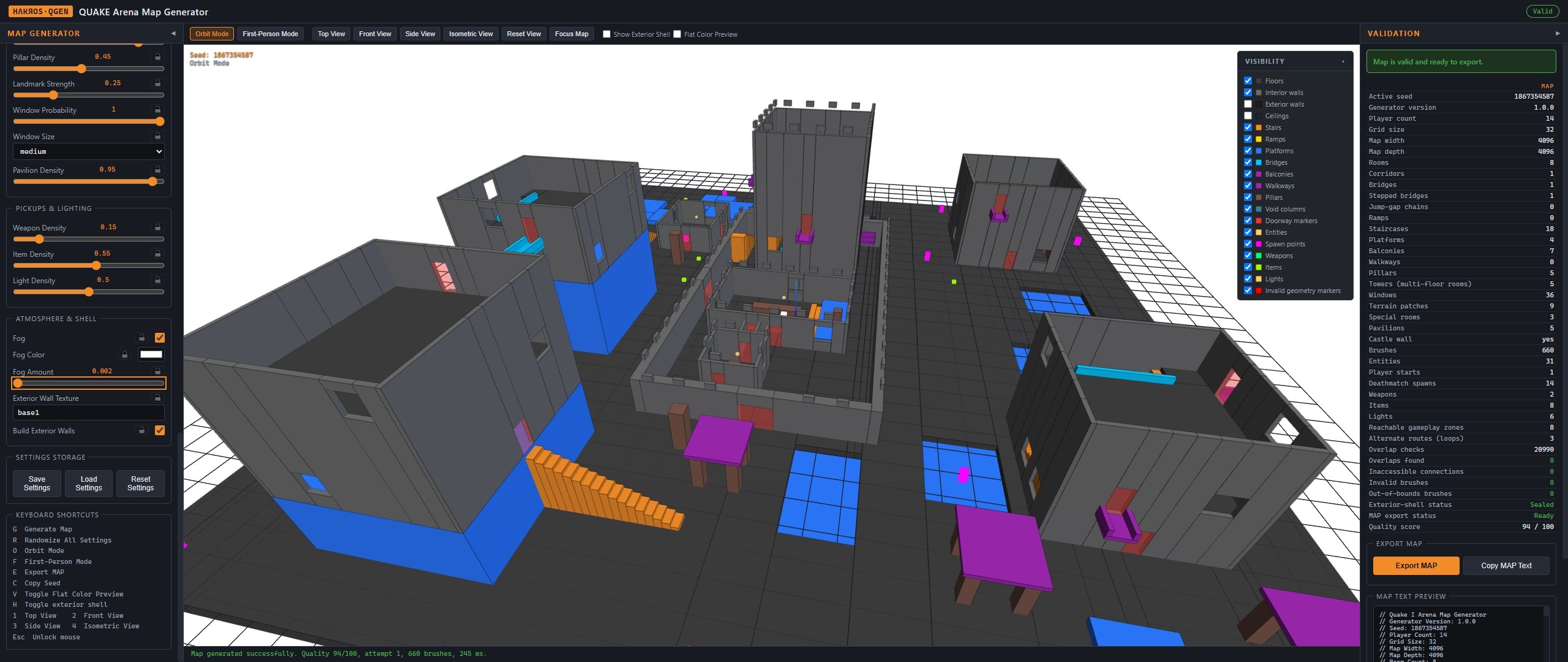
Generate complete arena maps for QUAKE in seconds. Set your parameters, hit generate, walk through the result in 3D, and export a ready-to-compile .map file.
What it does
QGEN builds full arena levels from scratch — rooms, corridors, bridges, stairs, platforms, pillars, windows, item placement and player spawns — and hands you a standard .map file ready for your compiler.
You are not drawing brushes. You are describing the kind of arena you want, and then judging the result. A map that would take an evening to block out by hand appears in under a second, which changes how you work: instead of committing to one layout and refining it, you generate twenty, walk through the three that look promising, and keep the one that plays best.
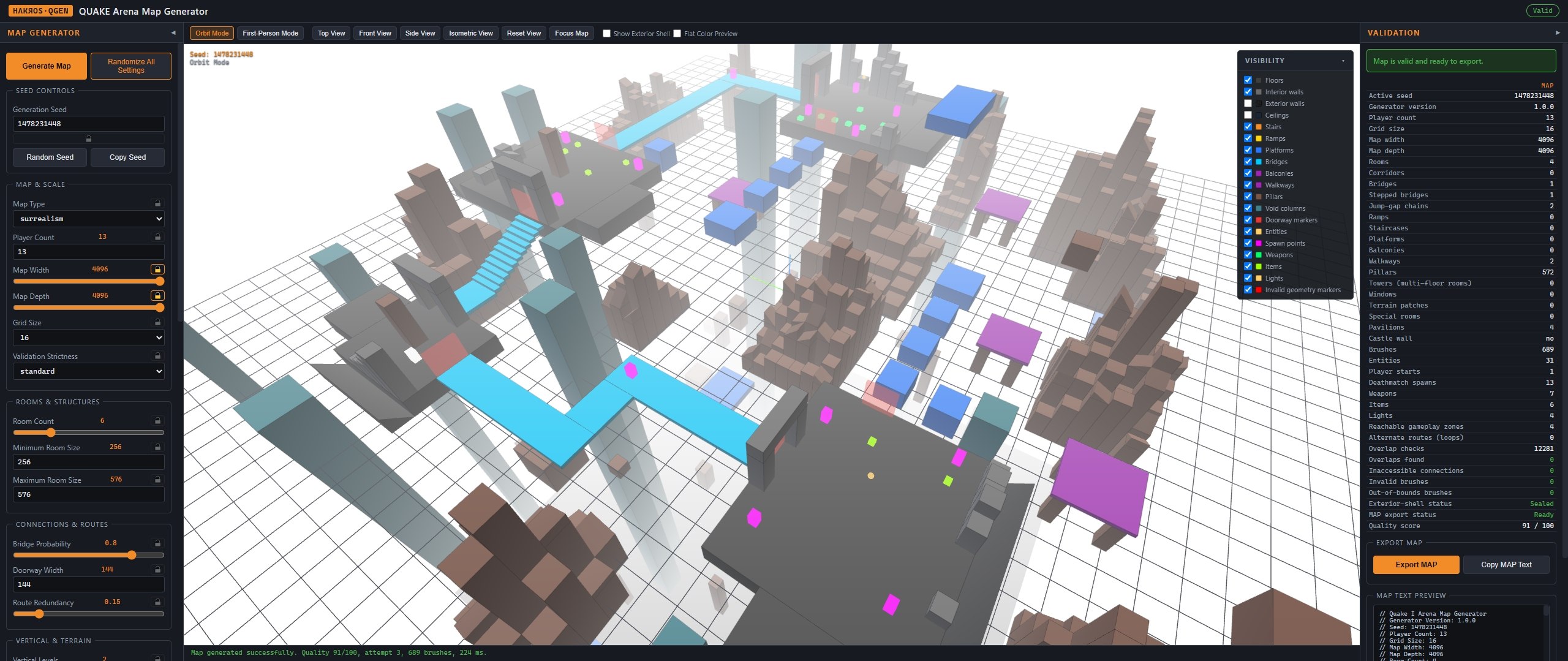
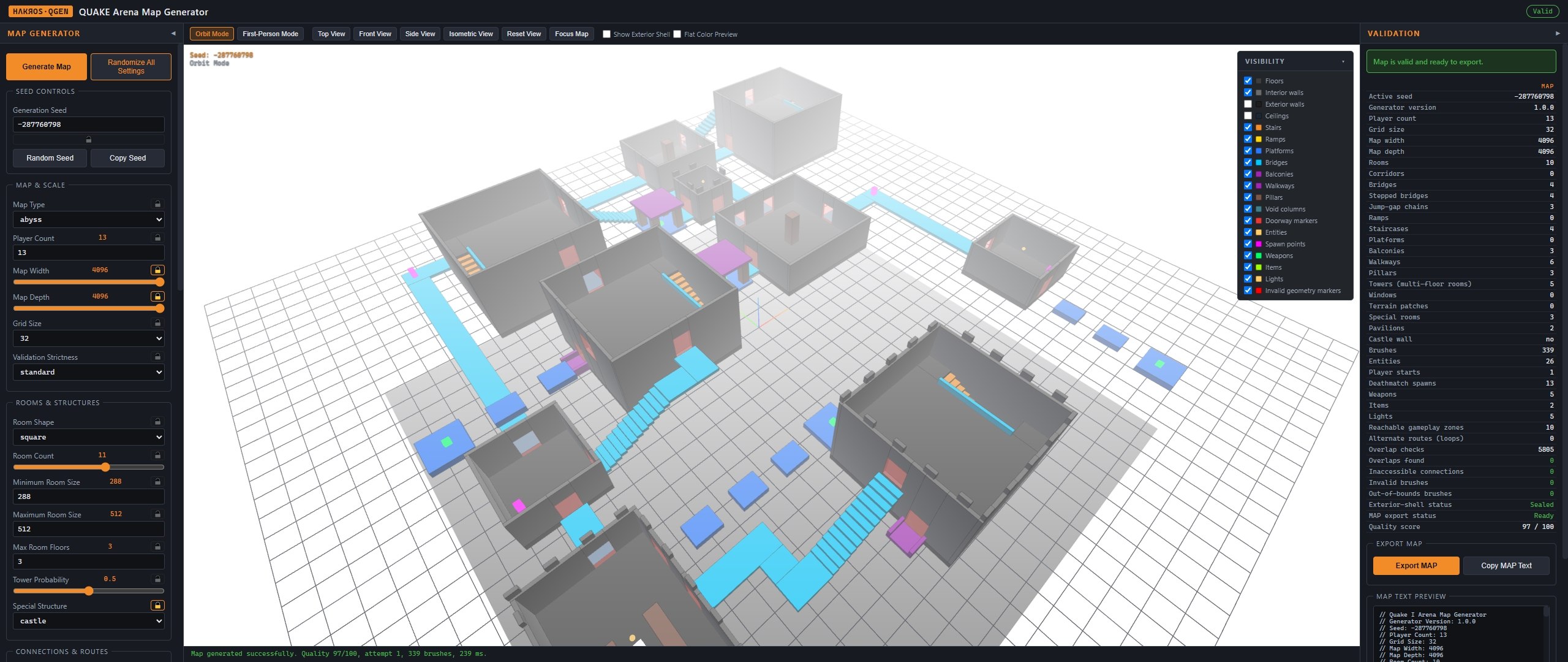
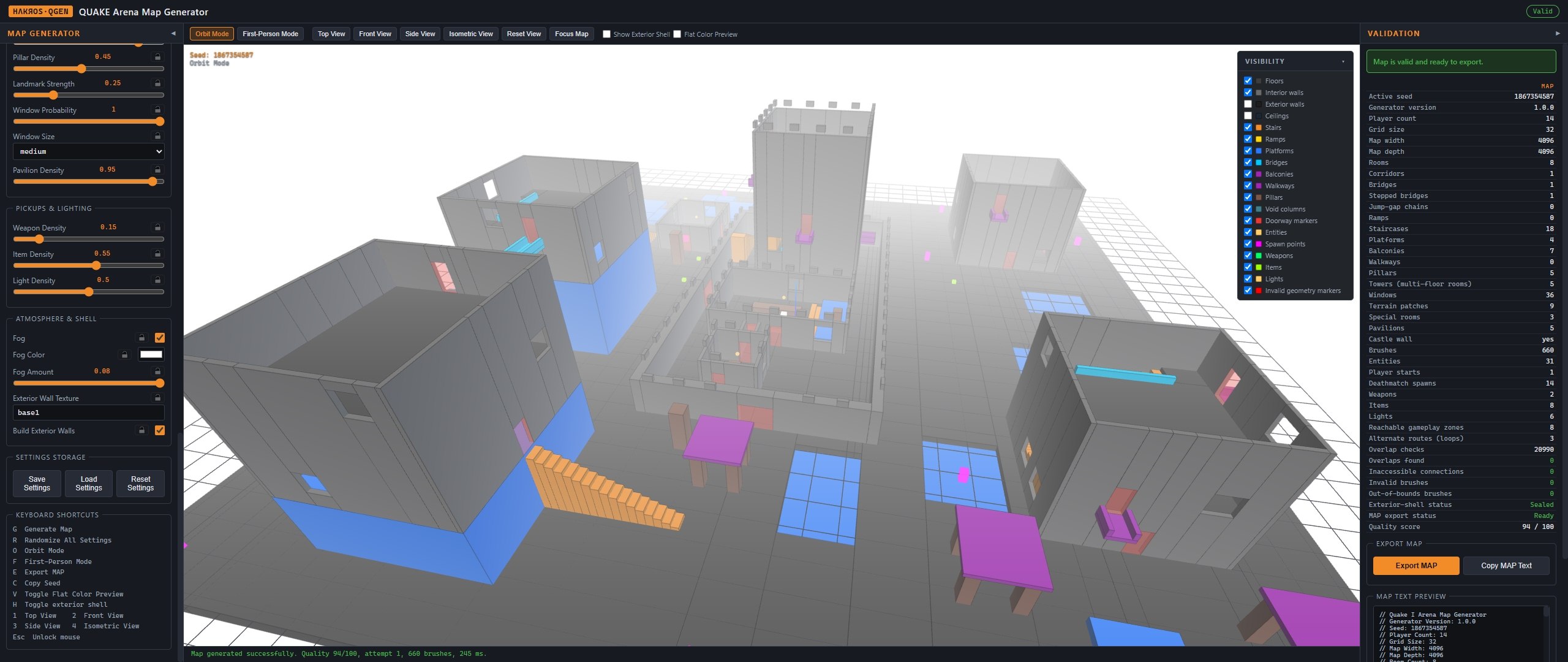
Preview before you compile. Every map opens immediately in a 3D viewport. Orbit around it to judge the overall shape, or drop into first-person mode and walk the level yourself to check sightlines, jump heights and how the space actually feels to move through.
Every map is reproducible. Generation is driven by a numeric seed. Copy the seed of a layout you like and you can return to it any time, or share it and someone else gets the exact same map.
Nothing broken gets exported. Each map is validated before export. Geometry errors, unreachable areas and missing spawn points are reported clearly, and if a configuration proves impossible to build, QGEN tells you why.
Works offline. No account required.
A note on units
Every dimension in QGEN is given in Quake units, the same scale your editor and compiler use. For reference while you set values:
- A player is roughly 32 units wide and 56 units tall.
- A step you can walk up without jumping is about 18 units.
- A standing jump clears roughly 45 units.
- A 96-unit doorway is comfortable for two players passing at speed.
- A 2048×2048 map is a compact duel or small free-for-all arena.
The interface
QGEN is a three-panel workspace.
Left — Map Generator. Every parameter that shapes the level, grouped by what it affects. Controls that don't apply to the current map type hide themselves automatically.
Centre — Viewport. The live 3D preview, with camera controls, view presets and visibility toggles.
Right — Validation and Export. The health report for the current map, and the export controls.
Seed controls
Generation Seed. A signed integer that drives every random decision in the build. The same seed with the same settings always produces the identical map — on any machine, in any session. This is what makes results shareable and revisitable.
Lock (padlock icon). Freezes the seed so Randomize All Settings leaves it alone. Locking the seed and rolling the settings explores different arenas built on the same underlying random sequence. Every individual setting has its own lock too, so you can pin down the two or three values you've decided on and let everything else vary.
Random Seed. Inserts a fresh seed and generates immediately. This is the button you'll press most often.
Copy Seed. Puts the current seed on the clipboard for your notes or to send to someone.
Map & Scale
Map Type
regular · abyss · surrealism — default regular
The single most consequential choice. It changes not just the look but which other settings even exist.
- Regular — a sealed arena with a courtyard floor. Rooms, corridors, stairs and ramps in a conventional enclosed layout. This is the classic deathmatch shape and the mode with the most parameters available.
- Abyss — floating towers over a void, connected by bridges and walkways. There is no ground. Falling kills. Fights become about controlling the connections between islands rather than the rooms themselves.
- Surrealism — open concrete plates suspended in a white void: chamfered slabs, stacked-cube battlements, arches, floating columns and jump gaps, in the spirit of the Nullspace maps. Deadly falls, minimal enclosure, heavy emphasis on movement.
Player Count
1 – 16, default 8
Drives spawn point count, overall scale, route density and how items are distributed. Set this to the player load you actually expect. A map generated for 4 players and then filled with 12 will feel cramped and spawn-heavy.
Map Width / Map Depth
1024 – 4096 units, step 128, default 2048 each
The horizontal footprint. These are independent, so a 4096×1536 map produces a long arena with a strong lengthwise axis, while equal values give a balanced square. Small values with a high room count force tight, interlocking layouts; large values with few rooms produce open ground between distant structures.
Grid Size
8 · 16 · 32 units — default 16
The alignment grid all geometry snaps to. 16 is the standard choice and matches how most Quake maps are built. 8 allows finer detail at the cost of a heavier brush count. 32 produces chunkier, more readable geometry that compiles fast.
Validation Strictness
standard · strict — default standard
How harshly the map is judged before export. Standard catches genuine problems. Strict applies tighter geometry rules and will reject maps that standard would let through — useful when you're generating in bulk and only want the cleanest results.
Rooms & Structures
Room Shape
rectangular · square · polygonal · mixed — default rectangular Regular and Abyss only
The footprint of each room.
- Rectangular — free width and depth, the most varied option.
- Square — equal sides, producing a more formal, symmetrical arena.
- Polygonal — L and T shapes, built as a main body plus an open annex. These create internal cover and sightline breaks that rectangles don't.
- Mixed — chosen at random per room.
Room Count
3 – 16, default 8
How many primary rooms and combat zones exist. This interacts strongly with map size: 16 rooms in a 1024×1024 footprint is a warren, while 3 rooms in a 4096×4096 map is three buildings separated by a lot of open ground.
Minimum Room Size / Maximum Room Size
Minimum: 192 – 512 units, default 256 Maximum: 256 – 768 units, default 448
The size range rooms are drawn from. A narrow band gives a uniform, rhythmic arena; a wide one produces dramatic contrast between cramped chambers and large halls. QGEN keeps at least 64 units between the two values, adjusting automatically if you push them together.
Max Room Floors
1 – 6, default 1 Regular and Abyss only
The ceiling on interior floors per room. At 1 every room is single-storey. At 2 or more, rooms can grow into towers with interior stairs and mezzanine levels, adding vertical fighting inside a single footprint. Tall towers need a tall exterior shell to contain them — see Exterior Wall Height.
Tower Probability
0 – 1, default 0.25 Regular and Abyss only
Given that Max Room Floors allows multiple storeys, this is the chance any individual room actually becomes a tower. At 0.25 roughly a quarter of rooms grow upward, which keeps towers as landmarks. At 1.0 every eligible room becomes one.
Special Structure
none · church · castle — default none Regular and Abyss only
Adds a themed set-piece room in addition to the standard rooms, giving the arena a recognisable centre of gravity.
- Church — a nave with pews, columns and an altar sanctuary, plus a bell tower.
- Castle — a great hall with tables, a dais and a throne, plus a stair tower and an armoury.
Connections & Routes
Corridor Density
0 – 1, default 0.5 Regular only
How much of the connection between rooms is enclosed corridor rather than open transition. Low values give an airy arena where rooms flow into each other; high values give a tighter, more claustrophobic layout with defined chokepoints.
Bridge Probability
0 – 1, default 0.45
The chance of generating a bridge between elevated rooms. Bridges are exposed by nature — high values create arenas where crossing between zones means being visible.
Ramp Probability / Stair Probability
0 – 1, defaults 0.4 and 0.6 Regular only
How elevation changes are resolved. Ramps preserve momentum and reward strafe-jumping; stairs slow movement slightly and read more clearly as architecture. These are weighted independently, so you can favour one, allow both, or push both low to force other kinds of vertical transition.
Doorway Width
64 – 160 units, step 16, default 96
The typical passage width. 64 is a squeeze that makes doorways defensible chokepoints. 96 is comfortable. 160 is wide enough that a doorway stops functioning as a bottleneck at all.
Route Redundancy
0 – 1, default 0.5
How many alternate paths exist between major zones. Low values produce arenas with clear, defensible routes where map control matters. High values produce flowing layouts where players can always come at you from somewhere else — harder to hold ground, harder to trap someone.
This is arguably the setting with the largest effect on how the map plays, as opposed to how it looks.
Vertical & Terrain
Vertical Levels
1 – 4, default 2
The number of elevation layers in the arena. 1 is entirely flat. Higher values stack the level in tiers, creating vertical sightlines and the kind of layered combat where above and below matter as much as left and right.
Height Variation
0 – 1, default 0.5
How pronounced the differences between those tiers are. Low values keep elevation changes subtle; high values produce steep, dramatic drops.
Terrain Levels
0 – 3, default 0 Regular only
Variation in the exterior ground. 0 gives a flat courtyard. 1 to 3 raise terrain patches at up to that many heights, reachable by jumping (32 units) or by ramps and steps the generator adds where needed. This breaks up open ground that would otherwise be a featureless killing field.
Exterior Wall Height
384 – 1536 units, step 32, default 640
The height of the outer shell. This has to accommodate everything inside it: elevated tiers plus the full height of any multi-floor towers. If you raise Max Room Floors or Vertical Levels and the shell can't contain the result, QGEN will tell you.
Ceiling Height
160 – 320 units, step 16, default 192
Indoor ceiling height. 192 is standard-feeling. Below that, interiors get oppressive and limit jumping. Above 256, rooms start to feel like halls. Note that this multiplies through towers — six floors at 320 units needs over 1900 units of shell, more than the maximum, so QGEN reduces floor count rather than exceed it.
Detail & Landmarks
Platform Density
0 – 1, default 0.4 Regular only
The amount of raised platforms and ledges. These are the small elevated surfaces that give players somewhere to go besides the floor — cover, ambush positions, and routes for anyone confident with movement.
Open Area Ratio
0 – 1, default 0.4 Regular only
The balance between enclosed rooms and open combat areas. Low values give a building-like arena of connected chambers; high values open the map into plazas and courtyards where long-range weapons dominate.
Pillar Density
0 – 1, default 0.3
How many pillars appear in larger rooms and courtyards. Pillars are the cheapest way to make a large space playable — they break sightlines, give cover, and provide reference points that stop an open area feeling anonymous.
Landmark Strength
0 – 1, default 0.5 Regular only
How often rooms get recognisable distinguishing features. This is a navigation setting as much as a visual one: in a procedurally generated arena, players orient themselves by remembering the room with the thing in it. Low values produce a more uniform, harder-to-learn map.
Window Probability
0 – 1, default 0.35 Regular and Abyss only
The chance, per room wall, of carving window openings. Not every room gets windows and placement is random per wall and per floor, so this produces variation rather than uniform treatment. Windows create sightlines between interior and exterior, and let players shoot out of and into rooms.
Window Size
small · medium · large — default medium Regular and Abyss only
Small is 64×64 units, medium 96×96, large 128×112. Larger windows are closer to open walls — more light, more exposure, easier to shoot and jump through.
Pavilion Density
0 – 1, default 0 Regular and Abyss only
Open pavilions: roofed platforms standing on columns, with no walls. On regular maps they stand in the courtyard, giving cover from above without blocking horizontal sightlines. On abyss maps they float beside the towers, connected by short decks. Off by default; raise it when open ground needs structure.
Pickups & Lighting
Weapon Density
0 – 1, default 0.5
The number of weapon placement locations. Low values make weapon control a central objective — whoever holds the rocket launcher holds the map. High values mean everyone is armed quickly and fights are decided by position and aim instead of pickup timing.
Item Density
0 – 1, default 0.5
Health, armour and ammo placements. Same trade-off: scarcity creates map control objectives, abundance creates sustained fights.
Light Density
0 – 1, default 0.5
The number of optional light entities written into the map. These are placed for your compiler's light stage — set this to 0 if you prefer to place lighting yourself after export.
Atmosphere & Shell
Fog
On / off — default on
Writes a fog key into worldspawn and shows fog in the 3D preview. Fog needs an engine that supports it — QuakeSpasm, Ironwail, vkQuake or FTE. The vanilla WinQuake renderer ignores the key, so the map still works, just without fog.
Fog Color
Colour picker — default white
Pure white gives the endless bright void of the reference Nullspace maps. Darker colours read as atmosphere and depth instead.
Fog Amount
0.002 – 0.08, default 0.016
Fog density on Quake's own scale, written directly to the fog key. As a guide: 0.005 is a faint haze, 0.02 a clear atmosphere, 0.04 heavy weather, and 0.08 matches the reference Nullspace maps, where anything past a few hundred units disappears entirely.
Exterior Wall Texture
Free text — default base1
The texture applied to the exterior shell walls and ceiling.
There is one special behaviour worth knowing: any name beginning with sky — sky1, sky4, sky_void — is compiled as sky. The shell still seals the map so the compiler is happy, but it renders as open sky rather than solid walls. This is how you get an open-air arena without breaking the compile.
Build Exterior Walls
On / off — default on
Whether the shell walls and ceiling are included in the exported .map.
Turn this off and the arena is genuinely open — which means the map will leak when compiled with qbsp. If what you want is an open look rather than a broken map, use a sky texture above instead. This setting exists for the cases where you intend to build your own shell afterwards.
Void & Columns
Abyss and Surrealism only
Build Void Floor
On / off — default on
Includes the deep kill floor beneath the floating islands. Turn it off and falls drop out of the level entirely, which leaks unless your shell walls are sky.
Void Floor Depth
256 – 3072 units, step 64, default 512
How far below the island bases that floor sits. Larger values make the drop feel bottomless and give the hanging columns room to descend.
Void Column Length
uniform · varied — default varied Surrealism only
Uniform runs every column below the plates all the way down to the void floor, giving a structural, architectural look. Varied gives them random lengths — some reach the bottom, others stop short and simply hang in the void, which reads as far stranger and matches the surrealist intent.
The 3D preview
Orbit Mode
Rotate around the map with the mouse, zoom with the wheel. Six preset views — Top, Front, Side, Isometric, Reset View and Focus Map — let you jump to a known angle instantly. Top view is the one to use for reading layout and route structure.
First-Person Mode
Walk the map yourself at player scale. WASD to move, mouse to look, Space to jump, Shift to sprint, Escape to release the cursor.
This is where you find out whether a map is any good. Sightlines that look fine from above turn out to cover half the arena; a jump that looks trivial in the overview turns out to need a run-up. Collision can be toggled off to fly through geometry and inspect it from inside, and a speed multiplier lets you cross large maps quickly or slow down for detail work.
Reset Player Position returns you to the player start.
Show Exterior Shell
Hides or shows the outer walls and ceiling. Off by default so you can see inside; turn it on to check how the shell contains your towers.
Flat Color Preview
Strips textures and lighting in favour of flat colour. Useful for reading pure geometry and spotting structural problems that surface detail would hide.
Visibility panel
Toggle individual categories of geometry — rooms, corridors, bridges, platforms, items, spawns — independently. Turning everything off except connections shows you the route graph of the arena on its own, which is the fastest way to judge whether the layout flows.
Validation
Every generated map is checked automatically, and the result appears in the right panel before you can export.
The report covers geometry errors, unreachable areas and missing spawn points, with statistics on the map alongside it. Export is blocked while fatal errors are present — the point is that you never take a broken map to your compiler and find out there.
When a configuration can't be built, four recovery options appear:
- Try Again — rebuild with the same settings and seed. Some failures are down to unlucky placement and clear on a retry.
- Use New Random Seed — same settings, different random sequence.
- Relax Optional Settings — QGEN loosens the non-essential constraints itself and rebuilds.
- Show Validation Details — the full report, when you want to know exactly which constraint you're fighting.
Some combinations are genuinely impossible: sixteen large rooms won't fit in a 1024×1024 footprint no matter how many seeds you try. The details view is how you find out which parameter to move.
Export
Export MAP opens a save dialog and writes a standard .map file, ready to open in your editor or feed to your compiler.
Copy MAP Text puts the same content on the clipboard.
MAP Text Preview shows the generated file in the panel, so you can inspect the actual output — worldspawn keys, brush definitions, entities — before committing to it.
Settings storage
Save Settings stores your current parameters and seed. Load Settings brings them back. Reset Settings returns everything to defaults.
Settings persist between sessions, as do your individual parameter locks, so a configuration you've tuned is waiting for you next time.
Keyboard shortcuts
| Key | Action |
|---|---|
G
| Generate Map |
R
| Randomize All Settings |
O
| Orbit Mode |
F
| First-Person Mode |
E
| Export MAP |
C
| Copy Seed |
V
| Toggle Flat Color Preview |
H
| Toggle exterior shell |
1 2 3 4
| Top / Front / Side / Isometric view |
Esc
| Unlock mouse |
A suggested first session
- Press R a few times and watch what comes out. Don't adjust anything yet — get a feel for the range.
- When something looks promising, press C to copy the seed somewhere safe.
- Press F and walk it. Two minutes in first person tells you more than twenty minutes in orbit.
- Go back and change one setting. Regenerate. See what moved.
- Lock the settings you've decided on, then roll seeds around them until the layout lands.
The parameters that change how a map plays, rather than how it looks, are Route Redundancy, Vertical Levels, Player Count and Open Area Ratio. If a map feels wrong to walk through but you can't say why, start there.
----
I'll hope you like it.
Greetings.
----
END USER LICENSE AGREEMENT (EULA)
Permission is hereby granted, free of charge, to any person obtaining a copy of this software and associated documentation files (the "Software"), to deal in the Software without restriction, including without limitation the rights to use, copy, publish, distribute copies of the Software, and to permit persons to whom the Software is furnished to do so, subject to the following conditions
THE SOFTWARE IS PROVIDED "AS IS", WITHOUT WARRANTY OF ANY KIND, EXPRESS OR IMPLIED, INCLUDING BUT NOT LIMITED TO THE WARRANTIES OF MERCHANTABILITY, FITNESS FOR A PARTICULAR PURPOSE, AND NONINFRINGEMENT. THE SOFTWARE MAY BE DISTRIBUTED, BUT ONLY FREE OF CHARGE. COMMERCIAL USE, COPYING, OR DISTRIBUTION OF THE SOFTWARE IS NOT PERMITTED WITHOUT PRIOR WRITTEN CONSENT FROM THE AUTHORS.
YOU MAY NOT DECOMPILE, REVERSE ENGINEER, DISASSEMBLE, MODIFY, BYPASS SECURITY MECHANISMS, OR ATTEMPT TO ACCESS THE INTERNAL SOURCE CODE OF THE SOFTWARE BY ANY MEANS. ANY SUCH ACTION IS STRICTLY PROHIBITED UNLESS EXPRESSLY AUTHORIZED IN WRITING BY THE AUTHORS.
IN NO EVENT SHALL THE AUTHORS OR COPYRIGHT HOLDERS BE LIABLE FOR ANY CLAIM, DAMAGES, OR OTHER LIABILITY, WHETHER IN AN ACTION OF CONTRACT, TORT, OR OTHERWISE, ARISING FROM, OUT OF, OR IN CONNECTION WITH THE SOFTWARE OR THE USE OR OTHER DEALINGS IN THE SOFTWARE.
----
Download
Install instructions

Development log
- Release 1.11 day ago
Leave a comment
Log in with itch.io to leave a comment.